

Integrations: connect to any webhook
Push data out of OpenPanel and into Slack, Discord, or any webhook. Trigger on the events you choose, with no polling and no glue code.
- Slack, Discord & webhooks
- Trigger on any event
- Custom payloads with JavaScript
- S3 & GCS export coming soon
What are integrations?
Integrations are the bridge between OpenPanel and everything else. They let you get data out of OpenPanel and into the tools and workflows your team already relies on.
The idea is simple: you create an integration (a connection to an external service), then attach it to a notification rule that fires whenever the conditions you define are met. That's it - OpenPanel handles the rest.
Here's an example: you want to be notified in Slack whenever a new user signs up from a specific country. You create a Slack integration, set up a notification rule that triggers on signup events, and use a template like "New user from {{country}}". Every time someone signs up, the message lands in your Slack channel - no polling, no cron jobs, no glue code.
It goes beyond alerts. With webhooks, you can push event data to any URL - including Zapier, Make, or your own backend. That means you can trigger custom workflows based on real user behavior: send a welcome email when someone completes onboarding, notify sales when a user hits a usage milestone, or log high-value events to an external system.
You can even trigger integrations when a user completes a funnel - combining OpenPanel's funnel analysis with real-time action.
Today, OpenPanel supports:
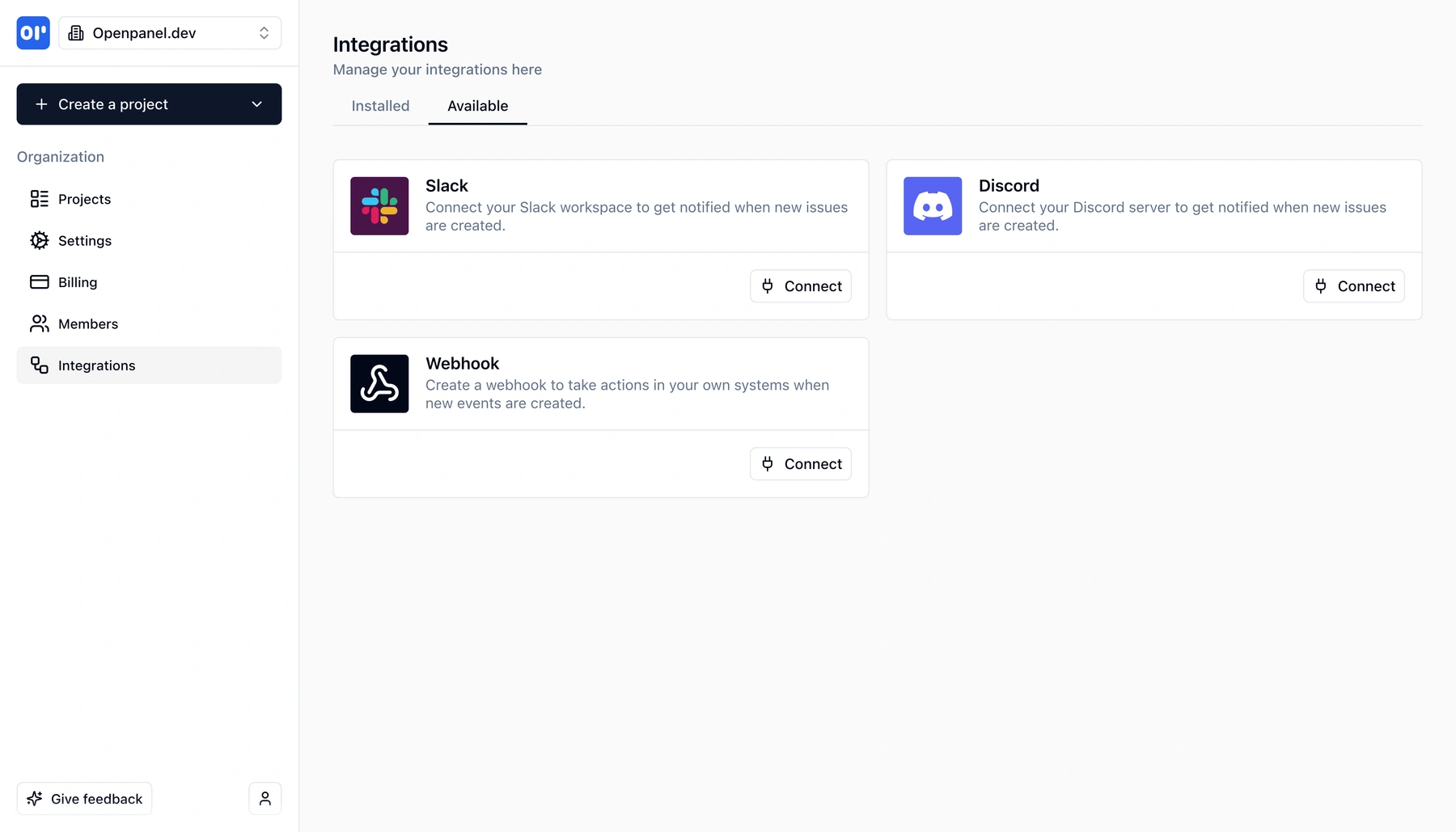
- Slack - post messages to any channel when events fire
- Discord - same as Slack, but for Discord servers
- Webhooks - send event payloads to any URL with custom headers and a JavaScript transform for full control over the payload shape
Coming soon:
- S3-compatible storage - automatically export events to Amazon S3, MinIO, Cloudflare R2, or any S3-compatible store
- Google Cloud Storage - export to GCS for easy import into BigQuery, Redshift, or your data warehouse
These storage integrations will let you import OpenPanel events into your data warehouse without custom ETL pipelines.
What you can do with integrations
From real-time Slack alerts to upcoming warehouse exports - integrations connect OpenPanel to your stack.
Slack & Discord notifications
Connect your Slack workspace or Discord server and receive messages whenever notification rules fire. Great for staying on top of signups, errors, or milestone events without leaving your chat tool.
Webhooks to any URL
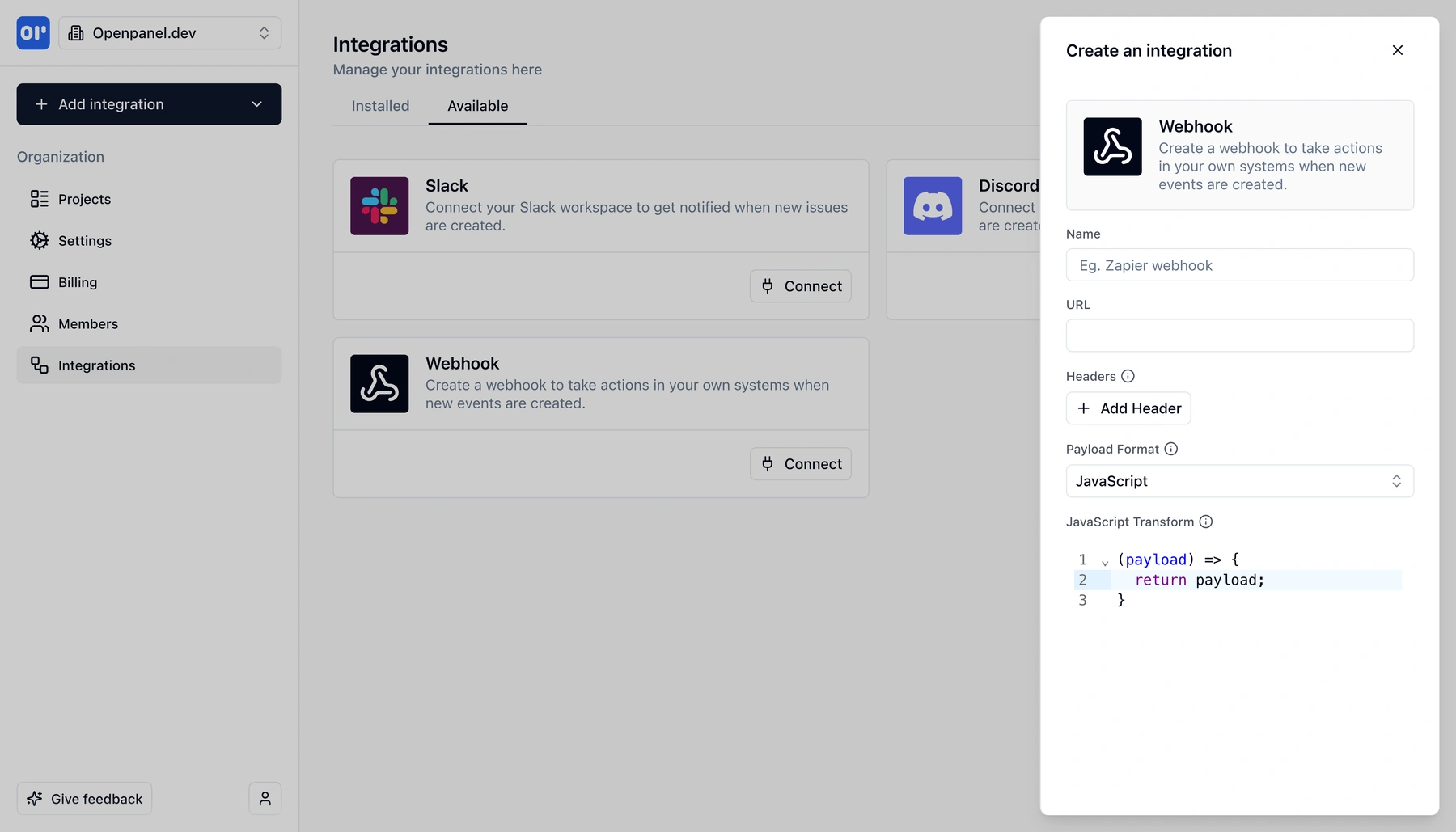
Send event data to any HTTP endpoint - your own API, Zapier, Make, or any automation platform. Define custom headers and use a JavaScript transform to shape the payload exactly how the receiving service expects it.
JavaScript payload transforms
Webhook integrations include a built-in JavaScript editor. Write a transform function that receives the raw payload and returns whatever shape you need - rename fields, filter data, or enrich the payload before it's sent.
Pair with notification rules
Integrations don't fire on their own - you attach them to notification rules. A single rule can trigger multiple integrations at once, and a single integration can be used by many rules.
Trigger on funnels and events
Notification rules can fire on specific events with property filters, or when a user completes an entire funnel. That means you can trigger a webhook when someone finishes onboarding, not just when they view a single page.
S3 & GCS export (coming soon)
Automatically export your events to S3-compatible storage or Google Cloud Storage. From there, import into BigQuery, Redshift, or any data warehouse - no custom ETL required.
How integrations work
Set up an integration in minutes, then let notification rules handle the rest.
Pick an integration type
Choose from Slack, Discord, or Webhook. Each type has its own setup - OAuth for Slack and Discord, URL + headers for webhooks.
Configure the connection
For Slack/Discord, connect your workspace or server. For webhooks, enter the target URL, add any custom headers, and optionally write a JavaScript transform to control the payload shape.
Create a notification rule
In the Notifications section, create a rule that defines when the integration should fire - e.g. when a screen_view event has a path starting with /onboarding. Attach one or more integrations to the rule.
Events trigger actions automatically
When an event matches a rule, OpenPanel sends the data to every attached integration in real time. No polling, no delays.
How teams use integrations
From team alerts to full automation pipelines - integrations turn analytics into action.
Real-time team alerts
Post to Slack or Discord when a new user signs up, a high-value purchase happens, or a critical error fires. Keep the whole team aware without anyone needing to check a dashboard.
Zapier and automation workflows
Send webhook payloads to Zapier or Make to trigger downstream actions - send a welcome email, update a CRM, add a row to a spreadsheet, or kick off an onboarding drip campaign. All driven by real user behavior.
Custom backend actions
Point a webhook at your own API to run custom logic when specific events fire. Credit a referral, flag a suspicious session, or sync analytics data to an internal tool.
Data warehouse export
With the upcoming S3 and GCS integrations, export events directly to your data warehouse. Load into BigQuery or Redshift for advanced SQL analysis, cross-referencing with other datasets, or long-term storage.
Related features
Explore more capabilities that work together with this feature.
Notifications
Notification rules control when integrations fire. Define events, filters, and templates - then attach integrations to act on them.
Event tracking
Integrations are powered by the events you track. The richer your event data, the more precise your triggers can be.
Funnels
Trigger integrations when a user completes an entire funnel - not just a single event.
Frequently asked questions
Common questions about OpenPanel integrations.
Ready to get started?
Track events in minutes. Free 30-day trial, no credit card required.
Set up your first integration