

MCP: ask your AI about your users
Let your AI deep dive into your OpenPanel data and understand what's going on. Skip dashboards and reports when you just want a quick answer.
- 38 tools
- Works with Claude, Cursor & Windsurf
- No install required
- Hosted by OpenPanel
What is an analytics MCP server?
The Model Context Protocol (MCP) is an open standard from Anthropic that lets AI clients connect to external data sources and tools. An analytics MCP server is a bridge: it translates your AI's requests into analytics queries and returns structured data the AI can reason over.
Without it, getting an answer from your analytics looks like this: open the dashboard, navigate to the right view, build or find the right chart, read the number, close the tab, context-switch back to what you were doing. If the answer leads to another question, repeat.
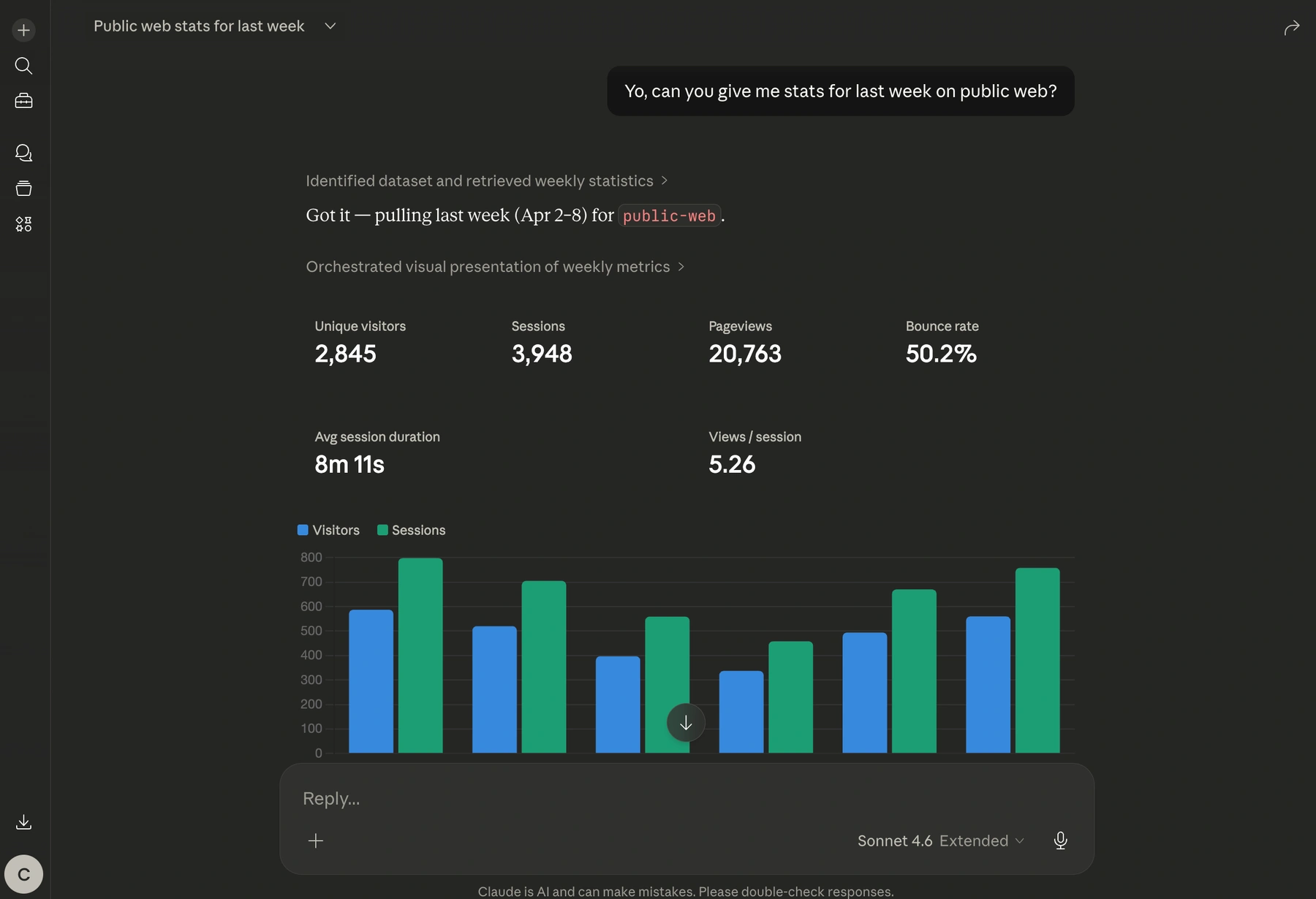
With OpenPanel's MCP server, you ask and get an answer—inside the tool you're already in.
"What's the 7-day retention for users who signed up last month?"
"Which funnel step has the biggest drop-off this week?"
"Show me the last 5 sessions for user@example.com"
OpenPanel hosts the server at api.openpanel.dev/mcp. There's nothing to install or run locally. You create an API client in your dashboard, generate a token, and add the URL to your AI client's config. That's it.
The server exposes 38 tools covering every layer of your product data:
- Events and sessions — query raw events, filter by property, inspect individual sessions
- User profiles — look up users, their event history, and activity timeline
- Funnels — run funnel queries for any defined event sequence
- Retention — get cohort retention by day, week, or month
- Page analytics — top pages, entry/exit pages, performance metrics
- Reports and dashboards — fetch saved report data by name
- Google Search Console — clicks, impressions, top queries, SEO opportunities (requires GSC connected)
How this compares to the Google Analytics MCP server:
Google Analytics MCP connects to GA4 data—pageviews, traffic sources, sessions in GA's data model. OpenPanel's MCP connects to your product data: custom events, user profiles, funnels you've defined, retention cohorts. If you're tracking what users do inside your product, OpenPanel's MCP answers those questions. GA4's doesn't.
Authentication uses a base64-encoded token built from your client ID and secret. The server is read-only—your AI can fetch and query data but cannot write events, modify users, or change any settings.
What you can do with it
38 tools covering every part of your analytics—queryable in plain language from any MCP client.
Ask questions in plain language
No SQL, no chart builder. Describe what you want to know and your AI handles the query. Works for funnels, retention, top pages, user lookups, and anything else in your data.
Funnel and retention analysis
Run funnel queries for any event sequence or pull cohort retention tables—without opening the dashboard. Ask follow-up questions and the AI queries again.
User and group lookup
Find any user by email or ID, get their full event timeline, session history, and lifetime metrics. For B2B products, look up groups and their member profiles.
Google Search Console data
If GSC is connected to your project, your AI can also query SEO data—top queries, ranking opportunities, keyword cannibalization, and per-page performance.
Works with every major AI client
Claude Desktop, Claude Code, Cursor, Windsurf, VS Code with MCP extensions, or any other MCP-compatible client. One URL, one token, works everywhere.
Stays in your existing context
Analytics questions come up while you're building or debugging. MCP keeps you in your editor—you get the answer without switching tabs or breaking your focus.
How to connect your AI to OpenPanel
Three steps. Nothing to install—the MCP server is hosted at api.openpanel.dev/mcp.
Create an API client
Go to Settings → API Clients in your OpenPanel dashboard. Create a `read` client to scope access to one project, or a `root` client for cross-project access. Copy the client ID and secret.
Generate your token
Your token is your client ID and secret joined by a colon, base64-encoded. Run `echo -n "CLIENT_ID:CLIENT_SECRET" | base64` in your terminal to generate it.
Add the URL to your AI client
Paste `https://api.openpanel.dev/mcp?token=YOUR_TOKEN` into your AI client's MCP server config. In Claude Desktop that's one JSON block in `claude_desktop_config.json`. In Cursor and Windsurf it's under MCP settings.
Start asking questions
Your AI now has access to all 38 tools. Ask about users, funnels, retention, or events. If you're not sure what events exist in your project, ask the AI to list them first.
Who uses it
Anyone who asks analytics questions while doing something else.
Product teams and founders
You're in a meeting, someone asks about last week's funnel drop-off. You ask Claude, get the answer in seconds, and move on. No one has to open the dashboard.
Developers in Cursor or Windsurf
You're debugging a checkout flow and need to know how many users hit that error state. Ask in your editor. The answer shows up next to your code.
Teams without a dedicated analyst
Most early-stage teams don't have someone who lives in the dashboard. MCP makes it practical for anyone on the team to get answers without learning the tool.
Related features
Explore more capabilities that work together with this feature.
Frequently asked questions
Common questions about OpenPanel's MCP server.
Ready to get started?
Track events in minutes. Free 30-day trial, no credit card required.
Connect your AI to your analytics