Is Mixpanel worth the price in 2026? For teams tracking under 1 million events, the free plan makes it one of the best product analytics tools available. Above that, the math gets hard fast. The Growth plan reaches $2,520/month at 10 million events and $5,320 at 20 million, before you add the paid upgrades for session replay, feature flags, account-level analytics, and multi-touch attribution. That's enterprise-tier spend without enterprise-tier support.
This guide breaks down what you pay at each tier, the add-on costs most teams miss, and the two cases where OpenPanel or PostHog end up much cheaper.
Mixpanel pricing at a glance
Mixpanel pricing starts with a free plan capped at 1 million monthly events. The Growth plan charges $0.00028 per event ($0.28 per 1,000 events) after 1M free events, reaching ~$2,520/month at 10 million events. Enterprise pricing requires contacting sales and typically starts around $25,000/year.
Here's the quick overview:
| Plan | Monthly Events | Price | Best For |
|---|---|---|---|
| Free | Up to 1M | $0 | Small projects, MVPs |
| Growth | 1M free, up to 20M | From $0 (scales with usage) | Growing companies |
| Enterprise | Unlimited | Custom (from ~$25K/year) | Large organizations |
Now let's break down what you get at each tier, what the add-on costs are, and whether Mixpanel is worth the price for your use case.
How Mixpanel pricing works
Mixpanel uses event-based pricing. You pay based on the number of events you track, not the number of users on your team or the number of projects you have.
An "event" is any user action you decide to track: a button click, a page view, a purchase, a sign-up. Each one counts as one event. If you track 10 actions and have 10,000 monthly active users, you could easily be looking at millions of events per month.
So your costs scale directly with usage. The more successful your product becomes, the more you pay.
Mixpanel free plan
Does Mixpanel have a free tier? Yes. The Mixpanel free plan includes up to 1 million monthly events with core analytics features. It's a decent starting point for small projects and early-stage startups.
Here's what's included in the free plan:
- 1M monthly events — once you hit the cap, you'll need to upgrade
- Core analytics — Insights, Funnels, Flows, and Retention reports
- 5 saved reports per seat — enough to start, but teams feel this limit quickly
- 10K monthly session replays — see exactly how users interact with your product
- 30 Spark AI queries per month — Mixpanel's AI-powered query builder
- Unlimited seats — no per-user charges
However, the free plan has significant limitations:
- No Group Analytics — essential for B2B products that need account-level analysis
- No data export — you can't pull data into a warehouse
- Limited behavioral cohorts — advanced segmentation requires Growth
- No formulas or saved metrics — basic reporting only
- No anomaly detection or root cause analysis
- No multi-touch attribution
- Limited custom properties and borrowed properties
- 5 monitoring alerts per project (Growth gets unlimited)
The free plan works well for validating a product idea or running basic analytics on a small project. But once you need collaboration features, advanced analysis, or your events exceed 1 million per month, you'll need to upgrade.
Mixpanel Growth plan
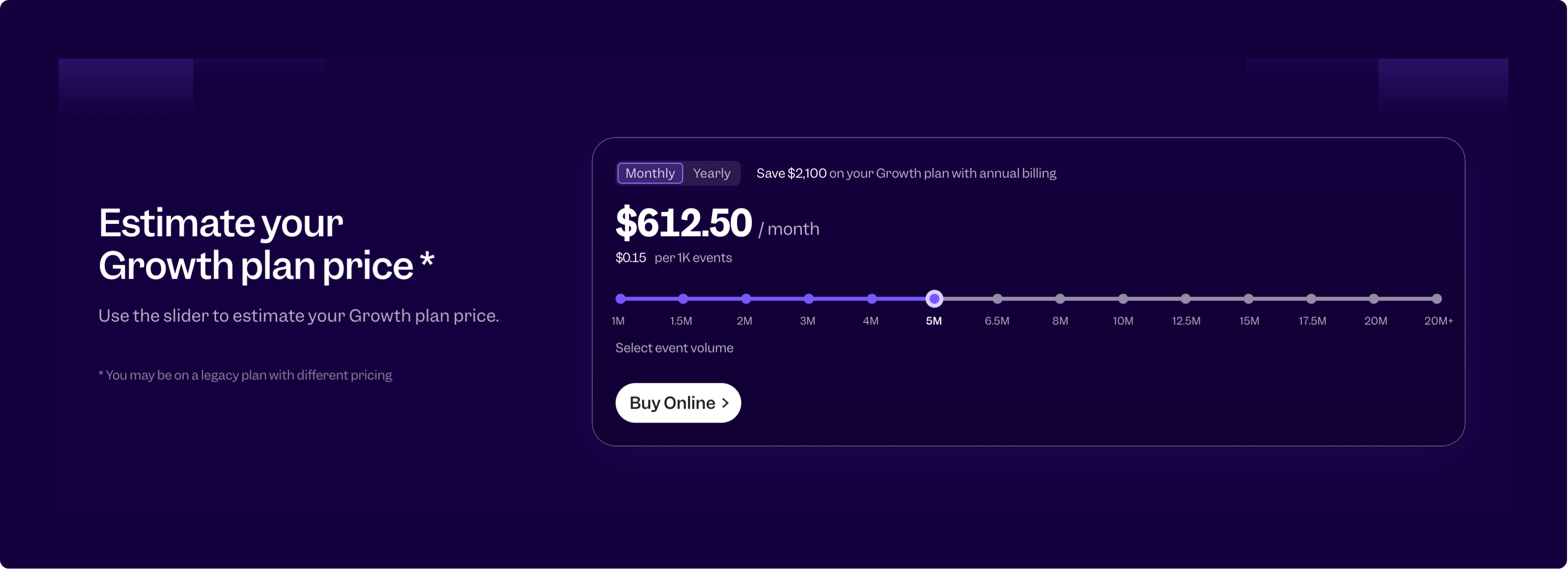
The Growth plan is where most paying customers land. It includes the first 1 million events free each month. After that, you pay approximately $0.00028 per event ($0.28 per 1,000 events), with volume discounts available at higher tiers.
Here's how Mixpanel Growth plan pricing scales with event volume:
| Monthly Events | Estimated Monthly Cost | Cost per 1K Events |
|---|---|---|
| 1M | $0 (free) | $0.00 |
| 2M | ~$280 | ~$0.28 |
| 5M | ~$1,120 | ~$0.28 |
| 10M | ~$2,520 | ~$0.28 |
| 20M | ~$5,320 | ~$0.28 |
| 20M+ | Contact sales | Volume discounts |
Prices are approximate based on Mixpanel's pricing calculator. Annual billing typically offers 10-15% discounts.
The Growth plan adds several important features over Free:
- Unlimited saved reports — no more caps on collaborative analytics
- Full behavioral cohorts — segment users based on actions
- 20K monthly session replays (customizable up to 500K)
- 60 Spark AI queries per month (double the free plan)
- Formulas & saved metrics — build advanced calculations
- Multi-touch attribution — understand which channels drive conversions
- Impact & statistical significance — measure feature impact
- Anomaly detection & root cause analysis — catch issues early
- Unlimited monitoring alerts
- Custom properties and borrowed properties — full flexibility
Note that these prices are for core analytics only. Several features many teams consider essential are paid add-ons on top of the Growth plan.
Free vs Growth plan: what's the difference?
If you're deciding whether to stay on Free or upgrade to Growth, here's a detailed breakdown:
| Feature | Free Plan | Growth Plan |
|---|---|---|
| Monthly events | Up to 1M | First 1M free, up to 20M |
| Saved reports | 5 per seat | Unlimited |
| Session replays | 10K/month | 20K free (up to 500K) |
| Spark AI queries | 30/month | 60/month |
| Behavioral cohorts | Limited | Full access |
| Custom properties | Limited | Full access |
| Formulas & saved metrics | Limited | Full access |
| Impact & statistical significance | No | Yes |
| Multi-touch attribution | No | Yes |
| Monitoring alerts | 5 per project | Unlimited |
| Anomaly detection | No | Yes |
| Root cause analysis | No | Yes |
| Cart analysis | No | Yes |
| Campaign reporting | No | Yes |
| Experiment reporting | No | Add-on |
| Feature flags | No | Add-on |
| Account-level analytics | No | Add-on |
| Data pipelines | No | Add-on |
| Metric Trees | No | Add-on |
| Lookup tables | Limited | Full access |
| Support | Email (standard) | Email (24/5) |
The bottom line: Free works for basic analytics and small projects. Once you need advanced features like formulas, cohort analysis, unlimited saved reports, or more than 1M monthly events, you'll need Growth. And even on Growth, several features are still add-ons that cost extra.
Mixpanel Enterprise plan
Enterprise pricing isn't published. You need to contact sales, and the final price depends on your event volume, feature requirements, and negotiation.
Based on publicly available data, Mixpanel Enterprise plans typically start around $25,000-$30,000 per year and can go well over $100,000/year for large-scale deployments.
Enterprise adds features that larger organizations need:
- Unlimited monthly events — custom volume with no caps
- Up to 1 trillion events capacity
- SAML-based SSO & SCIM provisioning — critical for security-conscious orgs
- Advanced data governance — sensitive data classification & protection
- Compartmentalized data access — granular permissions at the report level
- HIPAA compliance tools — for healthcare companies
- Customizable data retention policy — keep data longer than standard limits
- 300 Spark AI queries per month
- 24/7 support with faster response SLAs
- Slack shared channel support (add-on)
- Dedicated account manager
- Professional services available
- Signal correlation analysis — advanced analytics
- Cross-product analytics — analyze across multiple products
- Data quality monitoring and verified data
- Custom pricing & terms
If you're a larger organization with compliance requirements, need SSO, or require specific security features, Enterprise is where you'll end up.
The add-ons that add up
Here's where Mixpanel pricing gets tricky. Several features you might consider core functionality are paid add-ons, even on Growth plans:
Account-Level Behavioral Analytics (Group Analytics) is the big one. If you're building a B2B product, you almost certainly need it. It lets you analyze data at the account or company level, not just individual users. Without it, you can't answer questions like "which companies are most engaged?" or "what's our retention by account?" It's a separate line item on your bill, even on Growth and Enterprise.
Data Pipelines is another common add-on. It exports your Mixpanel data to a warehouse like BigQuery, Snowflake, or Redshift. If you need your analytics data in your warehouse, this cost adds up — estimates suggest $19,000+ annually for larger implementations.
Session Replay beyond the included free tier. Growth includes 20K monthly replays; if you need more (up to 500K), that's extra.
Warehouse Connectors import data from your warehouse into Mixpanel. Separate pricing.
Feature Flags for controlling feature rollouts. Add-on on Growth.
Experiment Reporting for A/B testing analysis. Add-on on Growth.
Metric Trees for visualizing metric dependencies. Add-on on Growth.
When budgeting for Mixpanel, factor in which add-ons you'll actually need. The base plan price can be misleading if you end up needing two or three add-ons to do what you want.
Mixpanel startup program
If you're an early-stage startup, Mixpanel offers a solid deal. Their startup program gives you a "Startup Plan" free for one year.
To qualify:
- Founded less than 5 years ago
- Less than $8 million in total funding
- Haven't redeemed similar offers before
The Startup Plan includes advanced features, Group Analytics, Data Pipelines, Warehouse Connectors, and Session Replay. You get up to 1 billion events over the year and 500,000 session replay recordings.
There's a catch: you need to start sending data within 90 days of acceptance, or you get removed. And after the year is up, you'll need to move to a paid plan or downgrade to Free.
It's a good deal if you qualify, but plan ahead for when that first year ends. Many startups get locked into Mixpanel during the free year and face a big bill when it expires.
When Mixpanel gets expensive
Mixpanel's event-based pricing ties your costs directly to your product's growth. Here's a realistic scenario.
Say you're tracking 15 events per user. Your product has 50,000 monthly active users, each doing an average of 20 tracked actions per session, with 3 sessions per month. That's:
15 × 50,000 × 20 × 3 = 45 million events per month
At that volume, you're well past the Growth plan's 20M cap and into Enterprise territory — likely $40,000+ per year minimum.
Now imagine you launch a marketing campaign that doubles your user base. Your analytics bill just doubled too.
Some teams respond by tracking fewer events or being selective about what they measure. That's a shame. You want your analytics to grow with your product, not limit what you can learn about your users.
The other thing that catches people off guard is add-ons stacking up. Base plan + Group Analytics + Data Pipelines + extra Session Replays can easily 2-3x your expected bill.
What users say about Mixpanel pricing
On G2, Capterra, and similar sites, pricing is one of the most common complaints about Mixpanel:
"The jump from free to paid can be steep." Many users start on the generous free tier, get comfortable with the tool, and then face a significant cost when they outgrow it.
"Gets expensive at scale." Companies with large user bases or those tracking many events find costs escalating quickly.
"Add-ons feel like they should be included." Group Analytics in particular gets called out. For B2B products, it's essentially a required feature, but it's priced separately.
"Pricing forced us to track less." Some users report deliberately limiting their tracking to stay within budget, which defeats the purpose of having comprehensive analytics.
To be fair, many users think Mixpanel provides good value, especially compared to building custom analytics infrastructure. The complaints tend to come from teams that have scaled past the free tier and are comparing costs to alternatives.
Mixpanel vs OpenPanel: pricing comparison
Since you're reading this on the OpenPanel blog, let's be upfront about how we compare. We built OpenPanel as a more affordable alternative to Mixpanel.
Here's how pricing stacks up at different event volumes:
| Monthly Events | Mixpanel Growth | OpenPanel Cloud | Savings |
|---|---|---|---|
| 100K | ~$0 (free tier)* | $20 | — |
| 500K | ~$0 (free tier)* | $50 | — |
| 1M | $0 (free tier) | $90 | — |
| 2.5M | ~$420 | $180 | 57% cheaper |
| 5M | ~$1,120 | $250 | 78% cheaper |
| 10M | ~$2,520 | $350 | 86% cheaper |
| 20M | ~$5,320 | $530 | 90% cheaper |
| 30M | Contact sales | $680 | — |
| 50M | Contact sales | $900 | — |
*Mixpanel's free tier covers up to 1M events but with limited features (5 saved reports per seat, no Group Analytics, no data export, limited cohorts).
At 10 million events, OpenPanel is ~86% cheaper than Mixpanel's Growth plan. But price is only part of the story.
Everything is included. With OpenPanel pricing, all features are included at every tier. Unlimited websites, unlimited users, unlimited dashboards. No tiers within tiers, no add-ons, no "contact sales for this feature." Pick your event volume and that's your price.
Self-hosting is free. If you want maximum cost control, you can self-host OpenPanel for free. Your only cost is infrastructure — a decent VPS can handle millions of events for $20-50/month.
Privacy by default. OpenPanel uses cookieless tracking out of the box, so no cookie consent banners. That means more accurate data, because you're not losing users who decline cookies.
No hidden costs. Mixpanel's Growth plan price is just the starting point once you factor in Group Analytics, Data Pipelines, extra Session Replays, and other add-ons. OpenPanel's price is the full price.
We're biased here, of course. Mixpanel has been around longer, has more integrations, and has a larger team. If you need specific capabilities only Mixpanel offers, it might be worth the premium. But for most teams doing product analytics, OpenPanel covers the core use cases at a fraction of the cost.
See our full Mixpanel vs OpenPanel comparison for a feature-by-feature breakdown.
Tips for managing Mixpanel costs
If you decide Mixpanel is the right tool, here are ways to keep costs under control:
Be intentional about what you track. Don't track everything just because you can. Define your key metrics and the events that feed them. You can always add more tracking later.
Use the startup program if you qualify. That free year gives you runway to grow before analytics costs hit.
Consider annual billing. Mixpanel typically offers 10-15% discounts for annual commitments. If you're confident you'll stick with the tool, this is easy savings.
Audit your tracking regularly. Over time, teams accumulate tracking that's no longer used. Old features get deprecated and experiments end, but the events keep flowing. A quarterly audit can trim unnecessary events.
Negotiate at renewal. B2B SaaS pricing is often negotiable, especially at higher volumes. Don't just accept the renewal quote — ask what flexibility exists.
Evaluate add-on necessity. Before committing to Group Analytics or Data Pipelines, check whether you truly need them or if there are workarounds.
Making the decision
Mixpanel is a solid product. The analytics are powerful, the UI is well-designed, and there's a reason it's one of the most popular tools in the category.
But pricing matters. If you're a growing startup watching your runway, a bootstrapped company keeping costs lean, or an enterprise justifying spend to finance, you need to understand the true cost of your analytics stack.
The questions to ask yourself:
- How many events will you realistically track as you grow?
- Do you need Group Analytics for B2B analysis?
- Do you need data export to a warehouse?
- What's your total cost including add-ons, not just the base plan?
- What happens to your budget when your user base doubles?
If the answers make you nervous about Mixpanel's pricing trajectory, look at alternatives before you're locked in.
OpenPanel offers a 30-day free trial with no credit card required. You can try it alongside Mixpanel and see which fits your needs and budget. And if you want maximum control over costs and data, self-hosting is always an option.
Related articles
 Guide
GuideWhat Is Cohort Analysis? A Practical Guide to Retention & Churn
OpenPanel Team · 2026-05-29
 Guide
GuideHow to Export Data from Umami Analytics
OpenPanel Team · 2025-10-30
 Guide
GuideCookieless Analytics: Best Tools & How They Work in 2026
OpenPanel Team · 2025-06-17
 Guide
GuideWhat Is a Conversion Funnel? How to Build & Optimize One
OpenPanel Team · 2025-03-31
 Guide
GuideHow to Self-Host OpenPanel Analytics Platform
OpenPanel Team · 2025-02-28
 Guide
GuideSelf-Hosted Analytics Without DPAs: GDPR, HIPAA, CCPA Guide
OpenPanel Team · 2024-12-08